> ## Documentation Index
> Fetch the complete documentation index at: https://docs.agent.ai/llms.txt
> Use this file to discover all available pages before exploring further.
# Knowledge Base & Files
[Knowledge bases in ](https://agent.ai/builder/files)[Agent.ai](http://Agent.ai) are organized collections of documents that your agents can reference in their workflows. Think of them as specialized folders containing information that you want your agents to know and use. You could have separate knowledge bases for product documentation, internal policies, and more.
Knowledge bases and files can be used in certain agent actions like:
[Get User KBs and Files](https://docs.agent.ai/actions/get_user_knowledge_base_and_files)
[Get Data from Builder’s Knowledge Base](https://docs.agent.ai/actions/get_data_from_builders_knowledgebase)
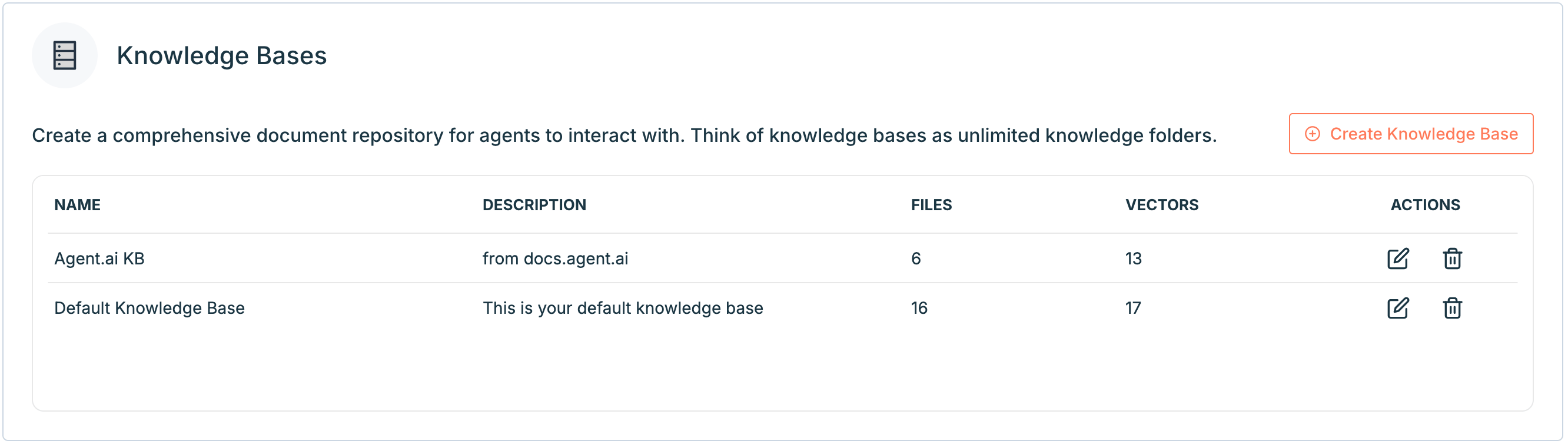 On this page, you can see how many files and vectors are in each knowledge base. Vectors are small chunks of text from your uploaded files that have been converted into a format the AI can search and understand. They help the agent find and respond with the right information.
You can edit the name or description by clicking the **Edit** icon. You can also delete a knowledge base by clicking the **trash** icon.
Deleting a knowledge base will also delete all files within the knowledge base.
## Upload Files to Knowledge Bases
In the “Files” section, you can upload files directly to a knowledge base. You can also click on a file name to preview its contents or click the **trash** icon next to a file to delete it.
On this page, you can see how many files and vectors are in each knowledge base. Vectors are small chunks of text from your uploaded files that have been converted into a format the AI can search and understand. They help the agent find and respond with the right information.
You can edit the name or description by clicking the **Edit** icon. You can also delete a knowledge base by clicking the **trash** icon.
Deleting a knowledge base will also delete all files within the knowledge base.
## Upload Files to Knowledge Bases
In the “Files” section, you can upload files directly to a knowledge base. You can also click on a file name to preview its contents or click the **trash** icon next to a file to delete it.
 If you have any questions about setting up Knowledge Bases or managing your files in [Agent.ai](http://Agent.ai), please reach out to our [support team](https://agent.ai/feedback).